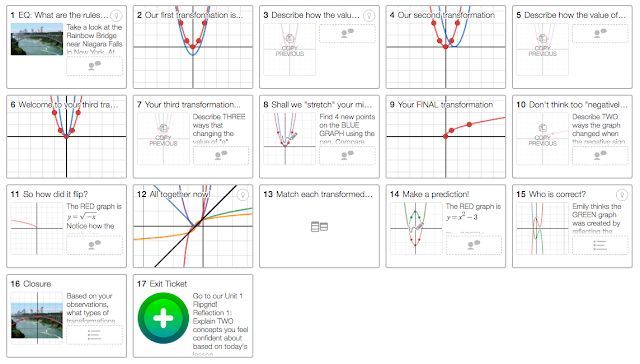
One of the biggest topics in a secondary mathematics class is function transformations (horizontal/vertical shift, compressions, stretches, etc.) Usually students will memorize the rules rather than understand the reasoning. I needed a way to enhance the lesson to allow students room to investigate these concepts and draw their own connections and conclusions - time to spice things up with technology!
Topic: Intro to Transformations
Essential Question: How can I transform ANY function?
Materials:
Desmos Activity - Make a copy if you'd like to make some adjustments! (link)
Student Notes - Google Slides(link) Click [Use Template] to make your own copy in your Google Drive.
1 device per 2 students - I recommend a Chromebook/computer.
Recommendation: a Google Classroom to share the notes with each student.
Student Notes (Google Slides) Preview
Teacher Notes:
Assign the notes in Google Classroom where each student gets a copy.
Go to teacher.desmos.com. If you don't have one, create an account! I recommend with a Google Account to make the sign-in easier.
Open the Desmos Activity (Intro to Transformations) above.
Click on the teal [Create Class Code]. This will need to be copied on Slide 1 in the Google Slides. This is how students will access the activity.
Desmos Activity (Preview)
Students will partner up and bring their computer/Chromebook. Each student can login so that everyone answers the activity questions and can take screenshots to add to their Google Slides for their notes.
Encourage students to take their time exploring each transformation carefully. They may struggle understanding shifting left and right. I related it back to the distance formula - (x - 3) moves RIGHT 3, not LEFT.
The Exit Ticket/Reflection piece is on Flipgrid. Create a TOPIC in Flipgrid where students can respond.
TIP: I created a topic for EACH UNIT in my class so that students could see how their questions and reasoning improved as the unit continued.
My Reflection:
Since the remaining of the year (and future mathematics courses) depended on this lesson, I felt strongly about student exploring it on their own. I tried teaching the rules one year and it only set them up for failure later.
I'm currently reading Shake Up Learning by the infamous Kasey Bell of Texas. In her first couple of chapters, she stresses the importance of integrating 21st century skills into as many lessons as possible - hence, shake things up! Students will be asked to analyze critically and shoving rules in their faces wasn't accomplishing this and was NOT preparing my students for their future careers. Careers where thinking on their own and creating their own connections would be a requirement.
One of my biggest fears with "shaking up their learning" is that my students won't learn the concepts "correctly". What if they misunderstand and I don't catch it?! In my mind, technology allows me to assess formatively more often, therefore I can check understanding frequently. When my concern of "learning incorrectly" snuck in to my mind, I forced myself to remember Jo Boaler - making mistakes is a learning opportunity. Even more so, making mistakes will make their brains grow.
What is "random?" What does it mean mathematically to be "random"? Ask any person to pick a "random" number, and you'd most likely discover a pattern...wait, what?!
In Statistics and Probability units, students think they understand how random events work. They think they are sincerely selecting random numbers when asked. Funnily enough, this concept can be quite vague. In a previous post, I shared a lesson to help students understand the Law of Large Numbers.
In this one, I want to share a lesson where students understand when they pick a "random" number, it truly is NOT random. My goal with this lesson was for students to discover this definition by using inquiry. Students discover patterns and come to the conclusion that we don't actually pick "random" numbers - quite hilarious when you watch their eyes enlarge at the end of the activity.
Why I used technology:
Students are engaged by using their own sense of intuition and curiosity.
Google Sheets allows them to quickly graph the the class information and find averages without the hassle of too many steps.
Students log their observations on Google Slides, which they can reference later.
All links and materials students will need are in one location - Google Classroom on the Slides.
Students choose which graph they want to use and explain their choice.
Teacher can access all students Slides in Google Classroom and provide comments to students work without taking extra materials home.
Students create their own examples instead of being handed them. To me, this allows the learning to be their responsibility.
By sharing out definitions on a Padlet, students can share their thinking using various methods (text, picture, GIF, voice note, hand-drawn picture).
Students vote on their favorite definitions to develop the best one.
Ultimately, this enabled the lesson to be student-centered!!
Topic: Simple Random Samples
Essential Question: How can I create a sample of items that is truly random?
Warm Up: Students read a quick article about forensic linguistics using the link on Slide 1. They write what was surprising to them and how math was helpful in discovering the truth.
Activity: What is your Pseudonym? Students investigate the Federalist Papers to show how finding the average word length can determine authors. In this activity, students select their OWN 5 words they believe would best help them find the true average word length of the passage.
Students gather all the class data on the Google Sheet. Each student creates a graphical display of the data.
Now students use their calculator to select the 5 random words and calculate the average word length. Similarly, students gather all the class data and begin to compare the two rounds.
Expand: Students expand on their knowledge by investigating what a "simple random" sample is and create their own definitions to share on a class Padlet.
Encourage students to vote on the definitions they believe are the best. Ask students to find pictures online as well or draw something they can take a picture of and post.
IDEA: Have students grab a partner and submit one answer per team. If you want to keep their names, the definition that the class likes the most could win some prize?
Exit Ticket: As a closer, students fill out a Frayer Model with the formal definition, a picture, an example, and a non-example.
Take-Aways:
When students developed their own definition, they could remember the concept at a deeper level throughout all the units following.
Gather their examples (from Google Classroom) for the next day as a practice activity. Have the students organize the examples into 2 categories (Good/Bad) to see what they've learned. Discuss examples that students had difficulty classifying.
Introduce other sampling methods as a follow-up activity. Students can compare and contrast the various methods and when to use each one.
Students can find articles where simple random sampling has been used or why it was not used.
Check out the Mythbusters clip below where they check if yawning is actually contagious! Did Adam and Jaime use a Simple Random for their experiment?!
After reading Chapter 8 of Carl Hooker's Mobile Learning Mindset (for coaches), I had lots of ideas for our professional development - mainly interactive learning challenges.
These challenges involve "no direct training on actual technology and apps" but "every challenge requires technology" (82). Teachers are organized into teams and there are various challenges throughout the day/conference/time. Teams all have a teacher who is considered "high tech" as well. The example Carl provided had 10 TOTAL challenges that teams could pick from varying in tasks: create..., listen..., draw..., eat..., etc. I think it would be cool to have teachers submit their challenges either on a Padlet or even through a Google Form (that way all the links are in one spreadsheet). His argument is that if we desire our teachers to create a student-centered lesson, why not model this in our professional development?!
Some concerns that I will address with my team are:
How can we share new, up-coming apps to teachers?
How can we support teachers who would like the one-on-one tutorial?
How can we empower our teachers to create something similar if they believe it "takes too long to make"?
Could we run these challenges (one per semester) for teachers to earn PD hours?
Could we have teachers pair with other campuses? Create a Google Classroom for all these challenges?
One of my favorite parts of the book that caused me to pause and reflect was The Learning Pyramid. It made me breakdown previous sessions that I've provided and I came to the conclusion that a lot of my sessions were more passive - OH NO!! I think when we create PD that is more passive, teachers may not see the actual value of the technology or ideas that we present. We aren't providing them time to play, create, and brainstorm with their peers about what we're showing them! How can we expect them use this technology effectively if we don't provide them this time?!?
Based on Chapter 9-10, I have some additional thoughts moving forward, especially since our Elementary schools will be getting class sets.
Provide opportunities for parent education/parent nights to address concerns
Promote the learning of every technology staff member - how can I continue growing in my coaching skills and my technology competence?
Identify staff members that have a desire to incorporate technology meaningfully by meeting with admin and instructional coaches
For my second post about my book study with "Mobile Learning Mindset", I want to focus on the following: how can I adjust my coaching skills and presentations to take into account the TPACK model and share some ideas I have for new PD opportunities.
Carl mentions that teachers need time to change and that "in some ways, this slow and steady goal [creates] a lifestyle change" (p.45). Unfortunately, if teachers are rushed or feel like "technology integration" is a buzzword for the year, they may see this as temporary instead of staying in it.
As a coach, I know my role should include the following:
Provide scaffolds of support to Ts
Help Ts identify small "baby" steps to help them "walk" before they "run".
Model technology integration throughout presentations and trainings created because "every training is an opportunity to model effective tech integration" (p.63).
I know I've been to multiple "sit and get" sessions and I walk away feeling more curious about how it would look in my class. Two summers ago, I went to an AP Statistics Institute where the presenter modeled lessons and I was on fire about teaching that class. We actually did the activities we would use in class and then he'd provide extensions as we debriefed each one afterwards. Carl encourages presenters to allow the teachers to experience "the standpoint of the student in their classroom." I think if they see the benefit and an example in a presentation, they have a reference and can see how exciting devices can be in their classroom if used in conjunction with content and pedagogy.
How can I modify and enhance our current PD in the district?
Maybe what the could look like?
Develop more trainings around MRpart of SAMR
Run a monthly Twitter Chats to encourage Ts to reach out to not just their peers at their campus but globally as well.
Create online courses (taking notes over how this book study is run)
Provide monthly "Appy Hours" to my campuses that are geared toward specific, campus needs - use Google Forms to get ideas from the campus
Encourage teachers to share their successes/failures at the start of the technology trainings (perhaps anonymously to help Ts willingly share)
MY BIG IDEA: Creating digital badges for our technology website (Teacher Corner) based on the Ed Tech Tool category. Then create a digital directory so Ts can reach out to those on their campus or their content area district-wide for support using tech tools successfully. Each badge could even have 3 levels based on how many tech tools they've used and require a reflection piece. Furthermore, admin could have a minimum badge requirement or minimum level requirement.
Check out Chapter 5-6 Booksnaps!
I brainstormed for this blog post using MindMeister! It's one of my favorites. Here is my mindmap!
Why I love it:
Includes icons, emojis, and symbols
Easy to organize your thoughts with various templates
Everyone knows the famous question that's plagued children and adults for millenia...
How many licks does it take to get to the tootsie center of a Tootsie Pop?
One of my absolute favorite lessons in AP Statistics was the Tootsie Pop Lab. This lab emphasizes how to estimate the ACTUAL average amount of licks it takes to get to the center. Will this question ever be answered!? Non-Statisticians would tell you "nah", but the real Statisticians would use inference mathematics. In this realm, we can get pretty close to the actual answer by providing a range of possible answers that could be true - what Statisticians call a Confidence Interval.
A big idea running through the veins of Statistics is the idea of an unknown parameter - the ACTUAL population value. Example questions we could answer that have these unknown parameters would be...
What proportion of the world is covered in water?
What is the average life expectancy in the United States?
What is the average number of books teens read?
Clearly they were into it!
Clearly, it would be a challenge to find the ACTUAL percentage of the world covered in water or the actual average life expectancy, but we can get reallllllly close by taking sample measurements and drawing conclusions from there - i.e. finding a statistic!
In Statistics, it's about getting on the dart board - not the bull's eye!
This lab teaches students this very idea! We may never really know the answer, and THAT'S OKAY! Using inference to draw conclusions is what mathematics can yield - and even better, we can provide plausible answers! It's a rare glimpse into the power and insight that only mathematics can provide.
Activity: Tootsie Pop Lab
Essential Question:
How can I estimate the true average amount of licks it takes to get to the center of a Tootsie Pop?
Materials:
Tootsie Pop Presentation - Google Slides (click Use Template for your own copy!)
Tootsie Pop Analysis - Padlet (click Remake if you want to use it!)
Student Notes - Google Sheet (click [Make a Copy] and now it's in your Drive!)
Flipgrid - create 1 topic in Flipgrid where students can post their reflection asnwers
Possible Student Google Sheet
Provide students with the directions about licking their lollipop and remind them to lick in the SAME SPOT. You'd be surprised how into it your students get. I recommend putting them in partners, especially if you have a student who doesn't like lollipops.
As students begin to find their center, have each student enter in their number of licks on the Google Sheet. I highly recommend using Google Classroom to help you share information with students. You'll be sharing the Sheet, Flipgrid, and Padlet with them.
Teacher Presentation (other slides included)
PRO TIP: In Google Sheets, type "=" to get the formulas to work. For example, "=average(...)" and then students can select all the trials at once. It works similarly for the others.
Take-Aways:
The "homework" for the evening is not practice problems at all! It's all about reflecting on what they discovered in class. Students recalled previous information to see how it fits in to their new content.
Students LOVE candy (surprised about that?)
Students enjoyed working with REAL DATA! It's not made-up numbers from a textbook or internet. It was personal. They were the data.
Putting them in partners helped them find formulas in Google Sheets quickly and allowed them to process their ideas out loud.
Why I used Padlet: helps students collaborate all at once in an easy way. Students can add voice notes, drawings, text, links, and photos for everyone in the class to see. This allows students to express their learning in a variety of ways that best fits them.
Why I use Flipgrid: Students can post their reflection questions after the lessons and hopefully hear from other students. This way, students can respond to each others questions and really utilize peer feedback. This develops a community in the classroom, because we are all learning together.
Interested in the answer my students found? Check it out!
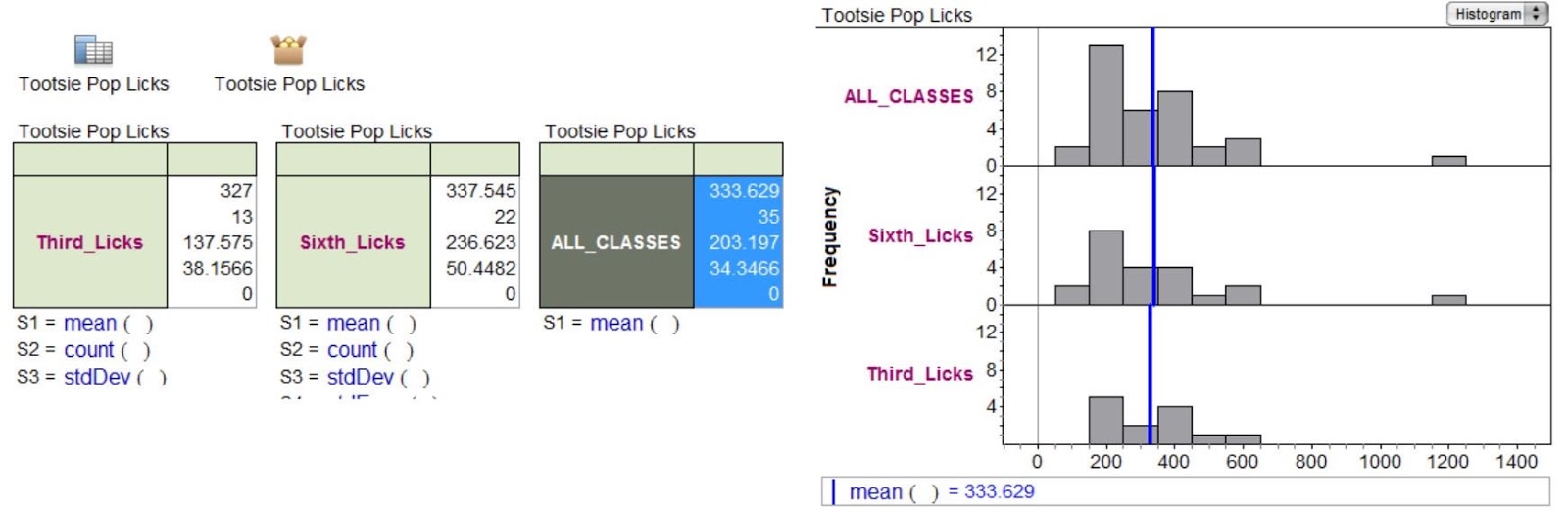
Before my district had Chromebooks for every student, I used Fathom to gather all of the data from my classes last year. Here is what we've discovered!
My students were really surprised that both classes had an average close to 330 licks.
After sharing my thoughts about what it can mean to have a mathematical mindset, I wanted to share my thinking about my other book study on the Mobile Learning Mindset by Carl Hooker. This quick read focuses on a shift that takes place when a 1:1 environment or even student devices are introduced. It offers various books based on your role - hence I'm currently reading the Coach's Implementation Guide.
A little background on me as I have morphed into a different role in my district this year. After being in the Secondary Mathematics classroom (from ESL to AP Mathematics) for 6 years, I was invited to join the Instructional Technology team. When Simon Sinek stresses to always START WITH THE WHY, which is interestingly enough where the book starts, I knew that's where I needed to start in order to help me adjust to my new surroundings.
My Why:
It was a challenge for me to leave the classroom, and to be frank, it's a battle that I struggle with on a daily basis. One of my favorite conversions occurred during my interview where I was offered to think about this new role differently - if I can provide powerful, meaningful professional development then I can impact teachers which therefore can impact students. Carl says it best...
"Professional learning directly affects the learning of their students." (3)
My How:
The best way that I can take my "why" and turn it into my "how" is to focus on some ideas I learned in Chapter 3. In Chapter 3, Carl discusses a Top 10 List of "no"s. From the list, there were 3 that really will change things up for me:
Do NOT make the training all about one person - instead take advantage of the "social energy" in the room. Recognize that everyone can be an expert.
Do NOT forget to model how you want them to teach - my favorite quote from this chapter is "don't be the sage on the stag, be the guide on the side." Encourage teachers to direct the off-task behavior to the learning objective. I need to create a similar effect in the PD offerings.
Do NOT focus on the apps - this is BY FAR the hardest one for me. It's a challenge to focus on just the pedagogy of technology integration without providing some concrete ideas for teachers to take away. I want to take it beyond the conversation! Carl instead focuses on "how can the technology make curriculum come to life?" and for me to focus on "[having] to know enough about the apps so [I] can find something that interests them" (26). I think reminding myself of this can guide me to have different conversations and take on the coaching-style of things.
Coaching Different Types of Teachers:
Carl finds there are 4 types of teachers and he equates them to an "Oregon Trail" attitude.
Who didn't love this game?!
Trailblazer: This teacher can take off running and try things out without fear.
Pioneers: This teacher can troubleshoot and will utilize the trailblazers as a guide to start.
Locals: This teacher can be develop a fixed mindset and not see the value of technology...YET!
Settlers: This teacher will get ready to "move to new land" if they can find the value in it...i.e. the WHY!! In order for them to move, they do need valuable PD opportunities to guide them on their "travels".
For me, I'm a pioneer.
I think I can get nervous trying things out for the first time. However, I will definitely utilize research that shows an improvement was made or the product has the value I'm looking for. On the other hand, I wouldn't think I'm a settler, because I still like to be the one to try it out sooner rather than later and I love sharing my thoughts and experiences with others. When I try out a tech tool and it engendered a positive energy for my students (and my caffeinated self let's be real), I felt a compulsive neeeeeed to share it with my team and anyone who would listen to my sentences filled with too many words that people were sure was a one-sentence paragraph.
Other Take-Aways (with the help of BookSnaps!)
Be on the look for additional posts coming soon about my reading adventures...
In one of my book studies that I'm participating in, I'm forced to reconsider the way mathematics is approached in the classroom. Dr. Jo Boaler is a professor at Stanford University for Mathematics Education. Her passion involves helping math teachers ACTUALLY TEACH mathematics. She strives to encourage teachers to move away from "sit and get" styles to pattern-investigation methods.
"When textbooks introduce only the simplest version of an idea, students are denied the opportunity to learn what the idea really is." Dr. Jo Boaler from Stanford University
What I'm reading
She is breaking down the wall and suggesting new, innovative ways to improve EVERY student's success in maths. She does not support the idea that you have a "maths" brain. She explores various research studies that show any student can learn maths if taught using some of her strategies which can include:
Show examples and non-examples of definitions
Rethink homework assignments to be reflection based instead of problem based
Have students explore different methods and compare and contrast
To reinforce concepts, have students use the concepts in different ways
NO memorization - but utilize BOTH sides of the brain
REMOVE timed-testing and math facts
I know what you're thinking...how can I do this? How can students learn maths if I don't show them the best methods and those precious shortcuts?!
One of my toughest lessons in Algebra was Completing the Square. Students didn't understand for one thing, why it was even called that! They couldn't remember "all the steps" and couldn't make a connection what was really happening. Students memorized the steps and continued on their year which eventually lead to a brain dump to make room for the next memorization event.
Jo discusses the idea of "compression" in our brains. She explains, "when you learn a new area of mathematics...it takes up a large space in your brain." Once you play with ideas and dig deep, you can "file" them away and "compress" them. My biggest "Ah-ha!" moment was when she states, "Notably, the brain can only compress concepts; it cannot compress rules and methods."
This allowed me to re-create my lesson on Completing the Square utilizing Algebra Tiles to help students explore the concept and build their own connections. If you've never used Algebra Tiles, I HIGHLY recommend it.
Student Notes (Google Slides)
Students build the polynomial using the tiles to literally make a square and determine how many 1's would it take to "complete" it. Throughout the process, students are reflecting on their learning and creating their own solving steps. For the extension exercise (i.e. homework), they will discover the Quadratic Formula! WHAAAA?!!?! Additionally, they will respond on a Flipgrid about their learning.
Student Reflection assignment
Materials:
Notes: Complete the Square (1 copy for each student) - Google Slides
Flipgrid: Create a Quadratics Topic for students to post their thinking
Bitmoji: Students add bitmojis on their exercises to show how they feel
My Take-Away:
Every student felt successful learning this new method. I had students make connections to other topics (graphing quadratics using the vertex) and even preferred this method OVER factoring! I couldn't believe the positive energy that was occurring and for once, the students were the ones doing the thinking! I became a guide for the day and my students didn't feel the need to have 20 identical problems for homework.
Questions you could ask them for reflection exercises (consider using Flipgrid):
What kind of number for "b" makes completing the square easier? Explain your thinking.
What do you think would happen if "a" is not 1?
Do you think this method could work every single time? Defend your position.
Is there a time that this method works better than another? Explain by creating your own example.