Showing posts with label Geometry. Show all posts

Saturday, April 4, 2020

Remote Mathematicians

In this "new world" of remote learning, keeping students engaged in content can seem daunting. That feeling of not just sharing content, but making it easily accessible and engaging enough for students to stay connected, brings its challenges.
As a previous math teacher, it was tough enough helping students enjoy the content, so flexing the "creativity" muscle in the brain was a CONSTANT.

During this time, I thought I'd share my top 3 go-to strategies!

TIP #1: Encourage inquiry and self-discovery!


  • Geogebra: This site offers Classroom Resources from elementary up to college courses. Students can explore theorems, visualize multiple cases, and then easily develop their proof. Geogebra even has built in activities with self-checks. Follow Tim or Steve on Twitter to see their creations.
  • Desmos: Teachers can create a FREE account and send activities to their students. Use one that's already made or create your own! Explore transformations and how variables can affect equations.
    • NEW UPDATE ALERT: Add a co-teacher!
    • NEW UPDATE ALERT: Send customized feedback to students.

TIP #2: Increase the open dialogue by using open tasks!

  • Which One Doesn't Belong: 4 boxes...which one doesn't belong? The best part - there is a reason EVERY SINGLE ONE doesn't belong. Bring the discussion into math and allow students to see there isn't just "one answer." Do you have gifted students? Encourage them to create their own!
    • Bitmoji Image
    • Copy/paste a puzzle and use THESE SLIDES! Share it with students so everyone can edit the same file. 
    • Numbers Example (for Elementary up to High School)
  • Open Middle Math: One problem can completely replace a worksheet! Students not only practice, but must use logic and reasoning to finish the puzzle. Available for K-12 students!
    • PRO TIP: Share on a Google Slides or Keynote for students to respond. They can drop in recording to explain their thinking.
    • PRO TIP: Use master slides to create text and image placeholders for students.
  • PRO TIP: Attach an Open Middle or WODB problem to the "Focus" in a Flipgrid Topic. Ss can use the whiteboard mode to share their thinking with their peers! 
TIP #3: Using the tech in your tool belt!

  • Keynote (on the iPad): While it is similar to Google Slides, Keynote on the iPad takes the advantage! A fantastic mathematician and edtech enthusiast, Morgan Cave, on the team I work on got me into this app, and there is NO turning back! As an Apple Distinguish Educator, she's continuing to push outside the box for how Keynote can be used to explore all concepts.
  • Google Slides (for Chromebook): 
    • Use master slides to create template responses with placeholders.
    • Ss can drop in pictures, links, videos, text, animations, and MORE all in one place.
    • Collaboration feature for discussions or group work is PERFECT! With the editing history, no work is lost and students are help accountable for their contribution.
  • Google Sheets (for Chromebook): Check out these helpful resources and templates using the "ugly step sister" of the G-Suite family!
  • Math Learning Apps:
    • Digital manipulatives for the WIN!
    • 100% FREE!
    • Includes annotation feature! 
    • PRO TIP: Ss can screenshot their creation, and drop it in Seesaw or Keynote to add audio!
  • Flipgrid:
    • Whiteboard Mode = PERFECT for explaining work.
    • Drop in a video, picture, and/or links in the Focus for your Topic.
    • Students don't want others to see their face? Use Pixel Mode!
    • Check out their Disco Library for Topics ready to go!

Friday, February 9, 2018

Chocolate-y stress in Math

After attending TCEA in Austin recently, I wanted to create a post about going digital in the math classroom, thanks to Amanda! In this post, I'd like to focus on the stress and anxiety that math can induce in students. Jo Boaler, an amazing educator who focuses on mindsets in mathematics, stresses (pun intended) that...

"When students get the idea they cannot do math, they often maintain a negative relationship with mathematics throughout the rest of their lives...the idea that math is a "gift" is responsible for much of the widespread math failure in the world."


My question is, so how can we encourage students to maintain a growth mindset in maths and how to create a class environment that is geared towards helping them achieve this? One way that I hope to answer this is share some lessons that had students arrive at different answers and that our final conclusion in class was THAT THIS IS OKAY! Jo wants students to see the creative and interpretive nature of mathematics, and I think an example lesson will help.

One of my favorite lesson styles is utilizing the 5E lesson model, where inquiry is at the heart of lesson. I think this is one of the best ways to encourage all students to interact with math and alleviates some of the apprehension students face. The lesson below will outline this style and materials are included at the very bottom if you're interested! You will need a Hershey Kiss for every student (why not help relieve stress in math by using a little chocolate???)

Title: Chocolate-y Odds

Essential Question: How can I determine the odds of a Hershey Kiss landing on it's side?

Audience: Statistics, Probability, Math Models and Applications, Geometry

Engage:


  1. Break students into group of 2-3 people. 
  2. Have students make predictions about what the odds are of a Hershey Kiss landing on it's side. Record their answers on a Mentimeter to gather the their thoughts quicker. 
  3. Sample Mentimeter
  4. Have students share out how they made their prediction. Consider how the Hershey Kiss is shaped and compare it to a coin.

Explore:

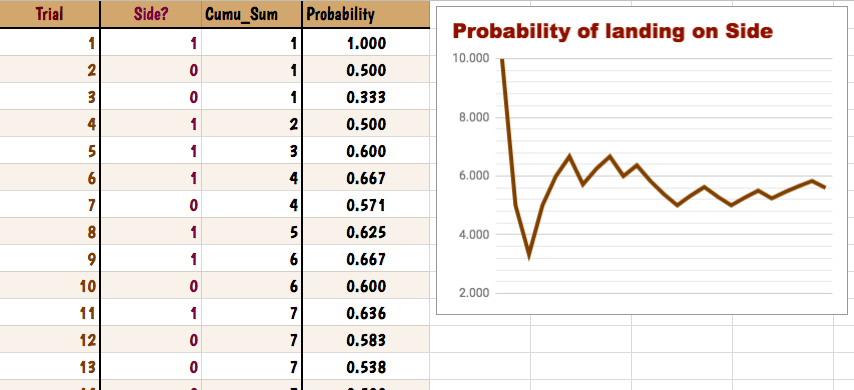
  1. Provide students with this Google Sheet so that they can record their data. Use a "1" if the Kiss lands on it's side and a "0" if it's on it's bottom. This can be done with their group. 
  2. Have students calculate the Cumulative Sum using Google Sheets. Example: if I want to add Cell B2 to B4, type "=sum(B2:B4)". If students don't want to type it, they can click and drag all the cells they want.
An Example of a final product!

  1. Have students calculate the probabilities with each step by dividing the cumulative sum by the trial number. Example: "=C3/C1" in the cell. 
  2. TIP: Google Sheets will start to PREDICT the formula if you keep using it over and over again! Simply click the "blue box" next to the cell and drag it all the way down! 
    The "blue box" is in the lower RIGHT corner
  3. Finally, have the students create a LINE GRAPH of their probabilities. Steps are included on the Google Sheet if you have students finish the sums early.

Explanation:

  1. Have students open the Google Slides. TIP: Share the Slides in Google Classroom by choosing "Students can Edit". 
    "Team Response" Slide
  2. Students to add the slide "Team Response" to the presentation. 
  3. Each partner/group will add their Probabilities Line Graph to the Google Slide and answer the questions with their team based on their graph.
  4. If students are finished early, have them go to another group's slide and provide some feedback, like a Bitmoji. 
  5. Click [Present] and go through each group's line graph. As you look through each one, have each team write down some observations on a Mentimeter. All students deserve a VOICE! We are in 2018, people!
  6. Choose Open-Ended on Mentimeter!
  7. Hopefully one of the observations between all the graphs is that the more times students tossed the Kiss, the line graph gets closer to a number!

CONGRATS, you've introduced the Law of Large Numbers/Kisses.

Elaborate:

  1. Have students interpret what it means when a coin is "50/50" using the Law of Large Numbers.
  2. Provide the example of the coin again. Ask, "If I keep getting tails over and over again, am I MORE LIKELY to get heads?" 
  3. Introduce the idea of independence - each toss doesn't affect the next one. The odds are ALWAYS 50/50 with each toss.
  4. Introduce that we are never "due" to get an outcome. This is called the Law of Averages and IS NOT TRUE.

Evaluate: 

Students find an object at home and toss it (not breakable, duh!) and create another line graph and share it on another Google Slides presentation. Open these up the next day and students can share their findings and how the Law of Large Numbers relates.

Extra Materials:


  • Teaching AP Statistics or Science: Designing Chocolate (Google Slides) - Experimental Design
    • TIP: If you're sharing in Google Classroom, choose "Students can Edit" so that everyone is on the same slides.
    • This is PERFECT if you teach AP Statistics to help students understand how to set up a proper experimental design.
  • Aren't 1:1 yet or have the devices you need? Here is a worksheet using the TI-84 Calculator instead!
  • Teaching AP Statistics? Use this data again to have students create confidence intervals! Use this worksheet if you'd like as a resource! I haven't made this digital...yet ;)

Interested in making Math more digital? Check out my Session Notes from the TCEA conference in Austin, Texas.